Receive and Inspect the Shipment
Carefully inspect the Roving Edge Device shipment before you unpack the shipment.
Report any damage or concerns to Oracle using a Support Request ticket. See Creating a Support Request.
Inspect the Shipment
-
Visually inspect the device shipping container for any damage, tampering, or missing ties before opening it.
- Unpack and visually inspect the device for any tampering or damage.
-
Ensure that you've received all the shipping kit contents. See one of the following inventory sections:
Roving Edge Device Shipment Inventory
The device ships with either a ruggedized case or a rackmounting kit based on what was ordered.
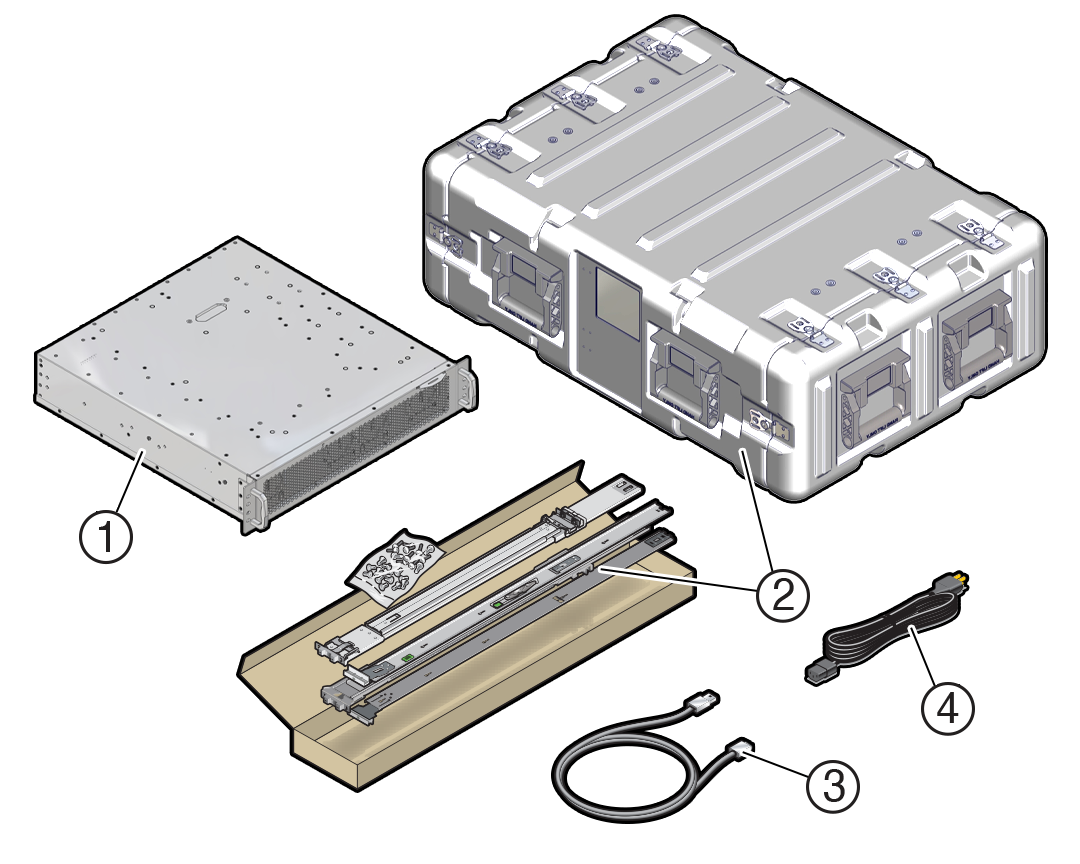
| No. | Item |
|---|---|
| 1 |
Roving Edge Device (GPU, Compute, or Storage model) |
| 2 |
One of the following:
|
| 3 |
USB-to-DB-9 serial cable For devices with ruggedized cases, the cable is in a pouch inside the rear of the case. |
| 4 |
AC power cord For devices with ruggedized cases, the power cord is in a pouch inside the rear of the case. |
- If your device is inside a ruggedized case, see Remove the Ruggedized Case End-Caps.
- If the device isn't in a ruggedized case, install your device in a rack. See Mount the Device in a Rack.