Remote Attestation for Confidential Computing
Use remote attestation to independently verify that confidential VM shapes on OCI are running in a trusted and secure environment.
About Confidential Computing and Attestation
Confidential computing protects data-in-use, by using technologies that isolate sensitive data and code in a trusted execution environment during processing to prevent unauthorized access or changes from outside of the environment. Remote attestation provides the mechanisms to verify the confidentiality and integrity of the Trusted Execution Environment (TEE).
Confidential Computing is important in environments where virtualized workloads might run on systems that use shared resources. Some hardware components provide technology to help isolate and protect workloads while they're running. These technologies add a hardware-based layer of isolation, protecting data in dedicated guest memory regions from access by the hypervisor or other guests. See Confidential Computing For Oracle Linux for more information on configuring Oracle Linux systems for confidential computing.
Remote attestation provides a mechanism for the guest VM to prove to a remote party that it's running in a trusted and secure environment. This is achieved through a series of cryptographic challenges and responses, which verify the integrity of the platform and the guest VM's memory regions. By configuring remote attestation, you independently verify that the systems where workloads are running are correctly configured to protect data during processing.
Support and Limitations
Remote attestation is supported on instances running the following versions of Oracle Linux:
- Oracle Linux 9
- Oracle Linux 10
Remote attestation requires Unbreakable Enterprise Kernel 8 (UEK 8) or later.
Instances must support AMD Secure Encrypted Virtualization - Secure Nested Paging (SEV-SNP). See confidential computing for a list of compute shapes that support this technology.
Attestation Software
Attestation software used for this solution consists of a verification server, an evidence collector, and an endorsement provisioning tool.
The components are:
-
veraison-services: The remote attestation verification server and associated services.
-
veraison-ratsd: The remote attestation evidence collector.
-
cocli: An endorsement provisioning tool.
Install and configure the attestation software on the instances according to their roles in remote attestation.
Attestation Roles
Attestation roles define the different actors or entities involved in remote attestation and how they're related.
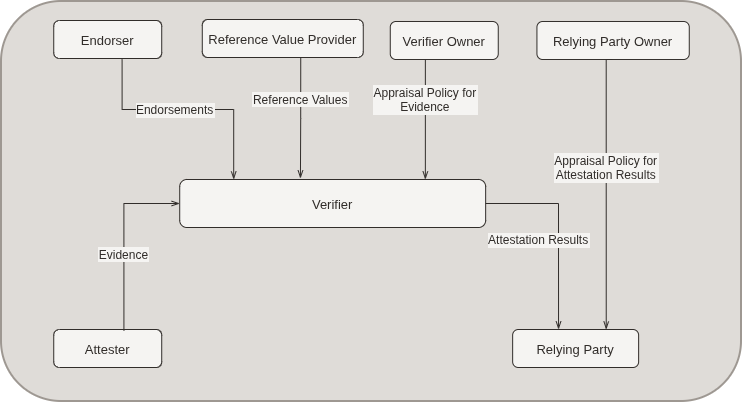
Core concepts used for this remote attestation framework are defined in RFC 9334: Remote Attestation Procedures (RATS) Architecture. The following key roles are defined:
-
Attester: An entity that creates evidence that's conveyed to a verifier in the form of claims. Claims are predefined encodings of information that can be collected about the instance.
In this case, the OCI instance that you want to verify is the attester, and runs the
veraison-ratsdevidence collection service. -
Verifier: An entity that appraises the validity of evidence about an attester and produces attestation results. Claims are appraised according at an appraisal policy that can use endorsements provisioned on the verifier to help evaluate evidence and establish trust. Policies are defined by the verifier owner.
In this case, the verifier is an instance running
veraison-services. -
Relying Party: An entity that depends on the validity of information about an attester for purposes of reliably applying application-specific actions. The relying party might be a server or an instance that trusts the verifier to securely provide attestation results for an attester.
In this case, the relying party is any instance configured appropriately to open a TLS-secured connection to the verifier over HTTPS, and which is configured with an appraisal policy based on the results provided by the
veraison-services. -
Relying Party Owner: An entity authorized to configure an appraisal policy for attestation results in a relying party. Setup of a relying party owner is outside of the scope of this documentation.
-
Verifier Owner: An entity authorized to configure an appraisal policy for evidence in a verifier. The verifier owner can also provision the verifier with endorsements.
In this case, the verifier owner can provision the
veraison-serviceswith endorsements by using the cocli provisioning tool. -
Endorser: An entity whose endorsements help verifiers appraise the authenticity of evidence and infer further capabilities of the attester. Because evidence about trustworthiness is complex, a verifier can use trusted endorsements provided by manufacturers, distributors, or device owners to evaluate the evidence provided by an attester.
In this case, the endorser might be the supplier of software artifacts.
-
Reference Value Provider: An entity whose reference values help verifiers appraise evidence to decide if acceptable known claims have been recorded by the attester. Similar to endorsements, trusted reference values are provided by manufacturers, distributors, or device owners, and can be used by a verifier to help evaluate evidence provided by an attester.
In this case, the endorser might be a hardware vendor, such as AMD.
These roles aren't always mutually exclusive, and an entity can take on several roles at the same time.
Setting Up Remote Attestation Components
Remote attestation components require set up and configuration on several instances within the infrastructure.
-
All attester systems or OCI instances that must provide evidence that they're running in a trusted execution environment.
-
A verifier instance that can evaluate the evidence provided by attester instances and which can be configured for vendor or third-party endorsements.
-
Any relying party instances that need to validate an attester instance against the verifier.
All components in a remote attestation environment must have network access to the TCP ports that are used for this service. If you have configured VCN security rules or security lists, you must ensure that these are correctly configured.
See Access and Security for more information.
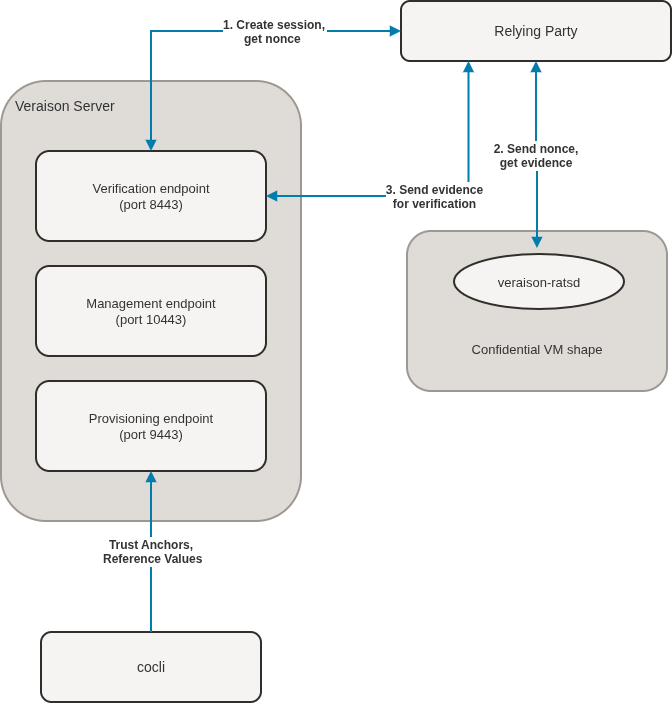
The following diagram shows the typical relationship and workflow between attestation components:
| Port | Component | Purpose |
|---|---|---|
| 8895 | veraison-ratsd (Attester) | REST API used for evidence collection and attester interaction. |
| 8443 | veraison-services (Verifier) | REST API and challenge-response endpoint used as the main verification endpoint. |
| 9443 | veraison-services (Verifier) | Endorsement provisioning API used by the cocli tool for the verifier. |
| 10443 | veraison-services (Verifier) | Verifier service API used for future expansion and supporting services. |
TCP port 50080 is used on the Verifier by
veraison-services for inter-process communication
with the veraison-vcek-cacher. Explicitly prevent
external access to this port if ingress firewall rules are unrestricted.
The veraison-vcek-cacher service caches the AMD-issued
VCEK (Versioned Chip Endorsement Key) certificate to minimize repeated
requests to AMD's KDS (Key Distribution Service) for the same certificate.
A VCEK is a unique key provisioned per AMD processor and used to sign attestation reports for AMD SEV-SNP. It enables confidential-computing attestation by binding a VM's identity to specific hardware and firmware versions. The cached VCEK certificate contains the VCEK public key, which is used to verify signatures on SEV-SNP attestation reports.
-
Set up attester instances by installing the
veraison-ratsdservice. See Setting Up an Attester. -
Set up a verifier instance by installing and configuring the
veraison-services. See Setting Up a Verifier. - Configure the TLS on any relying parties to ensure that connections are encrypted and validated when communicating with a verifier. See Configuring TLS for Relying Parties.
- Provision any third-party endorsements on the verifier to help evaluate claims and evidence submitted by any attesters. See Provision Endorsements on the Verifier.
Setting Up an Attester
An attester is a confidential computing instance. Install and set up the
veraison-ratsd software on each instance.
To set an instance up as an attester, perform the following steps:
Setting Up a Verifier
A verifier confirms the evidence supplied by the attester. The verifier need not be installed on a Confidential Computing instance, but it is recommended. Install and set up the veraison-services software on the instance.
To set an instance up as a verifier, perform the following steps:
Configuring TLS for Relying Parties
Relying parties communicate with the verifier over HTTPS. Configure the relying party to validate TLS certificates used by the verifier.
If the verifier is using self-signed certificates, any tooling on the relying party might fail SSL/TLS validation, if the signing certificate isn't available in the system CA trust store. You can skip this step if you configured the verifier to use CA signed certificates.
Provision Endorsements on the Verifier
You can load endorsements to the verifier system by using the cocli tool.
Endorsements and reference values are represented in a Concise Reference Integrity Manifest (CoRIM) data model that's shipped in Concise Binary Object Representation (CBOR) format. The cocli tool is used to work with CoRIM endorsement files and can perform various actions including submitting the endorsement to a verifier.
The cocli tool can be run on any system that can
connect to the verifier that's running the
veraison-services. For simplicity, run this tool on
the same host as the veraison-services.
Automatic Endorsement Provisioning
The following bash script provides an example approach to automate endorsement provisioning with the latest endorsements based on the documented procedure. Run this script on a cron job or as a systemd timer.
#!/bin/bash
sudo dnf update -y veraison-cocli

if [ $# -eq 0 ]; then
    echo "Error: Server address is required." >&2
    echo "Usage: $0 <server-IP-or-hostname>" >&2
    exit 1
fi

VERAISON_SERVER="$1"

for file in /usr/share/veraison-cocli/TA/*.cbor; do
        cocli corim submit --corim-file=$file --api-server="https://$VERAISON_SERVER:9443/endorsement-provisioning/v1/submit"\
        --media-type="application/corim-unsigned+cbor; profile=\"https://amd.com/ark\""
done

for file in /usr/share/veraison-cocli/RV/*.cbor; do
        cocli corim submit --corim-file=$file --api-server="https://$VERAISON_SERVER:9443/endorsement-provisioning/v1/submit"\
        --media-type="application/corim-unsigned+cbor; profile=\"tag:amd.com,2024:snp-corim-profile\""
done
To invoke the script, use the following syntax:
sh ./provision.sh <veraison-server-ip>In the previous, <veraison-server-ip> is the server IP address. For example:
sh provision.sh localhostPerforming Attestation From a Relying Party
Remote attestation is performed from a relying party to decide whether evidence or claims made by an attester host are valid. Validation is performed by the verifier. All interactions are performed using the REST API endpoints for services running on the attester host and on the verifier server.
Attestation is performed by a relying party that requires that an attester host is verified before running a workload on that host. The relying party performs remote attestation by using a set of REST API calls to gather evidence, evaluate the evidence, and return a report. The process consists of three API calls:
- Set up a challenge-response session on a verifier server, to obtain a verification token, known as a nonce, that can be used to tie evidence to a particular attestation report.
- Get evidence from the attester host about any claims that the system is making for its execution environment.
- Provide the evidence to the verifier server for evaluation and get the report to indicate whether the evidence is valid and the attester host can be trusted.
The API calls and some general approaches and examples are described. A relying party codifies these API calls to perform validation as required, so the example requests and response evaluations are intended only for illustration.
Terminology
The API interactions described use some terminology that might need further explanation.
- attester host base URI
-
A base URI includes the scheme and the authority part of a complete URI, where the authority includes the hostname and port number that a service is listening at. In the case of an attester host, running the
veraison-ratsdservice, the service listens on TCP port 8895, so the attester host base URI might look as follows:https://instance.example.com:8895 - challenge-response session
-
Attestation is performed as a single challenge-response session, where the participants in the session use a nonce as a token to ensure that the information returned by each participant belongs to the same session and can be trusted. The session is also allocated a session ID that's used to track the different stages of the attestation process. The session ID is returned as the location header when the challenge-response session is created.
- EAT attestation result
-
The EAT (Entity Attestation Token) Attestation Result (EAR) is a JSON Web Token (JWT) that contains the values that describe the results of the attestation in a serialized base64 encoded format. The format is described in more detail at https://datatracker.ietf.org/doc/draft-ietf-rats-ear/. The EAT attestation result is used by the relying party to decide whether the attester host can be trusted.
- nonce
-
A nonce ("number used once") is a random or pseudo-random value that's used only once in a cryptographic communication. The nonce is typically used to prevent replay attacks, where an attacker tries to reuse a previously valid message or authentication token.
A nonce is used to ensure that the evidence provided by the attester is fresh and hasn't been tampered with. The verifier generates a nonce and sends it to the attester, who then includes the nonce in the evidence. The verifier can then verify that the evidence is authentic by checking that the nonce matches the one it generated.
- verifier server base URI
-
A base URI includes the scheme and the authority part of a complete URI, where the authority includes the hostname and port number that a service is listening at. In the case of the verifier server, running the
veraison-services, the service listens on TCP port 8443, so the verifier server base URI might look as follows:https://veraison-services.example.com:8443
Create a Challenge-Response Session
API call to create a challenge-response session for remote attestation.
Request
To create a challenge-response session, send a POST request to the following endpoint on the verifier server base URI:
POST /challenge-response/v1/newSessionThe POST request can include the following mutually exclusive GET variables:
nonce: a pre-generated and URL-safe nonce. You can generate a nonce by running:nonce=$(openssl rand 64 | openssl base64 | tr '+/' '-_' | tr -d '=' | head -c 64)nonceSize: preferably set to 64 for a 64 byte nonce. Use this option if you need the service to generate a nonce for you. The nonce is returned in the response body, but note that the nonce that's returned isn't URL safe and you need to clean it for use in other requests during the challenge-response session.
Response
The response includes a location header entry, that's used to track a session when performing other interactions with the verifier server:
location: session/657f1750-7916-11f0-a190-333334633039The response body contains the nonce, expiry time, and a list of accepted formats. For example:
{
 "status": "waiting",
 "nonce":  "oWTtIjdJf8CR+ASRW70UOzeFHj5SdlFLBqan10pardkBK/7lOoSLMsdvhMF0DcqTpgg4nN08Ql2MWAmLFy97cg==",
 "expiry": "2025-08-13T19:13:24.96426094Z",
 "accept": [
     "application/vnd.parallaxsecond.key-attestation.tpm",
     "application/psa-attestation-token",
     "application/eat+cwt; eat_profile=\"tag:psacertified.org,2023:psa#tfm\"",
     "application/vnd.veraison.tsm-report+cbor",
     "application/vnd.enacttrust.tpm-evidence",
     "application/eat-cwt; profile=\"http://arm.com/psa/2.0.0\"",
     "application/eat+cwt; eat_profile=\"tag:psacertified.org,2019:psa#legacy\"",
     "application/pem-certificate-chain",
     "application/vnd.veraison.configfs-tsm+json",
     "application/vnd.parallaxsecond.key-attestation.cca",
     "application/eat+cwt; eat_profile=\"tag:github.com,2025:veraison/ratsd/cmw\"",
     "application/eat-collection; profile=\"http://arm.com/CCA-SSD/1.0.0\""
 ]
}
Store the location value from the response header to use when evidence is
submitted to the verifier server.
Store the nonce in HTTP response body, if you didn't pre-generate the
nonce for this query. The nonce is used when gathering evidence from an
attester, and appears in the attestation report returned by the attester.
The nonce returned in the response isn't URL safe. If you use the nonce as included in the JSON response, clean it before using it in any other request payloads. For example, you can run:
echo "oWTtIjdJf8CR+ASRW70UOzeFHj5SdlFLBqan10pardkBK/7lOoSLMsdvhMF0DcqTpgg4nN08Ql2MWAmLFy97cg==" | tr '+/' '-_' | tr -d '='Example Request
The following example command shows how to generate the nonce for a new session.
curl -X POST https://veraison-services.example.com:8443/challenge-response/v1/newSession?nonceSize=64Output might appear as follows:
HTTP/2 201
content-type: application/vnd.veraison.challenge-response-session+json
location: session/657f1750-7916-11f0-a190-333334633039
content-length: 837
date: Thu, 14 Aug 2025 13:55:54 GMT

{"status":"waiting",
 "nonce":"oWTtIjdJf8CR+ASRW70UOzeFHj5SdlFLBqan10pardkBK/7lOoSLMsdvhMF0DcqTpgg4nN08Ql2MWAmLFy97cg==",
 "expiry":"2025-08-14T13:58:24.75546442Z","accept":["application/vnd.parallaxsecond.key-attestation.cca",
 "application/eat+cwt; eat_profile=\"tag:github.com,2025:veraison/ratsd/cmw\"",
 "application/eat-collection; profile=\"http://arm.com/CCA-SSD/1.0.0\"","application/vnd.parallaxsecond.key-attestation.tpm",
 "application/psa-attestation-token","application/eat+cwt; eat_profile=\"tag:psacertified.org,2023:psa#tfm\"",
 "application/vnd.veraison.tsm-report+cbor","application/vnd.enacttrust.tpm-evidence",
 "application/eat-cwt; profile=\"http://arm.com/psa/2.0.0\"","application/eat+cwt; eat_profile=\"tag:psacertified.org,2019:psa#legacy\"",
 "application/pem-certificate-chain","application/vnd.veraison.configfs-tsm+json"]}
Get Evidence From an Attester
API call to get evidence from the veraison-ratsd service on the
attester host.
Request
To get evidence from from the veraison-ratsd service, send a POST request
to the following endpoint on the attester host base URI:
POST /ratsd/charesThe request body must contain the URL-safe nonce used in the challenge response session.
{
  "nonce": "oWTtIjdJf8CR-ASRW70UOzeFHj5SdlFLBqan10pardkBK_7lOoSLMsdvhMF0DcqTpgg4nN08Ql2MWAmLFy97cg"
}
Response
The response contains the evidence in the format specified in the previous step.
{"cmw":"eyJfX2Ntd2NfdCI6InRhZzpnaX29uIiwiZXlKaGRYaGliRzl..9pSm1ZV3RsWEc0aWZRIl19",
 "eat_nonce":"TUlEQk5IMjhpaW9pc2pQeXh4eHh4eHh4eHh4eHh4eHhNSURCTkgyOGlpb2lzalB5eHh4eHh4eHh4eHh4eHh4eA",
 "eat_profile":"tag:github.com,2024:veraison/ratsd"}
The value of the cmw key is a serialization of the evidence claim as a
JSON Web Tokens (JWT). You can store the complete output of the response to this query and
submit it as is for validation by the verifier server.
Example Request
The following example command shows how to get evidence from an attester host, by providing the session nonce.
curl -X POST http://instance.example.com:8895/ratsd/chares \
 -H "Content-type: application/vnd.veraison.chares+json" \
 -d '{"nonce": "oWTtIjdJf8CR+ASRW70UOzeFHj5SdlFLBqan10pardkBK/7lOoSLMsdvhMF0DcqTpgg4nN08Ql2MWAmLFy97cg=="}' \
 -o evidence
The output from this command is stored in a file named evidence. You
can use this file when submitting a request for an attestation result from the verifier.
For an end to end example, see the /usr/share/doc/veraison-ratsd/examples/attestation-sample.py available on the veraison-ratsd version 1.0.9 or later.
Get Attestation Result From Verifier
API call to get attestation result from veraison-services on
the verifier.
Request
To get the attestation result from the veraison-services, send a
POST request to the following endpoint on the verifier host URI authority:
POST /challenge-response/v1/<session_location>The request endpoint includes the session_location that's returned in the header of the original challenge response when the nonce was generated by the verifier server. See Get Evidence From an AttesterCreate a Challenge-Response Session.
The request header includes a Host value that matches the attester host
base URI , a Content-Type set to the format that the evidence was collected
as, and an Accept value to describe the intended response format. For
example:
Host: instance.example.com:8443
Content-Type: application/eat+cwt; eat_profile="tag:github.com,2025:veraison/ratsd/cmw"
Accept: application/vnd.veraison.challenge-response-session+json
The request body payload must contain the evidence obtained from the attester running the
veraison-ratsd service. See Get Evidence From an Attester.
Response
The response contains the evidence, and the EAT attestation result.
{
 "status": "complete",
 "nonce": "oWTtIjdJf8CR+ASRW70UOzeFHj5SdlFLBqan10pardkBK/7lOoSLMsdvhMF0DcqTpgg4nN08Ql2MWAmLFy97cg==",
 "expiry": "2025-08-14T16:44:22.733250762Z",
 "accept": [
  "application/eat-cwt; profile=\"http://arm.com/psa/2.0.0\"",
  "application/eat+cwt; eat_profile=\"tag:psacertified.org,2019:psa#legacy\"",
  "application/pem-certificate-chain",
  "application/vnd.veraison.configfs-tsm+json",
  "application/vnd.parallaxsecond.key-attestation.cca",
  "application/eat+cwt; eat_profile=\"tag:github.com,2025:veraison/ratsd/cmw\"",
  "application/eat-collection; profile=\"http://arm.com/CCA-SSD/1.0.0\"",
  "application/vnd.parallaxsecond.key-attestation.tpm",
  "application/psa-attestation-token",
  "application/eat+cwt; eat_profile=\"tag:psacertified.org,2023:psa#tfm\"",
  "application/vnd.veraison.tsm-report+cbor",
  "application/vnd.enacttrust.tpm-evidence"
 ],
 "evidence": {
  "type": "application/eat+cwt; eat_profile=\"tag:github.com,2025:veraison/ratsd/cmw\"",
  "value": "eyJjbXciOiJleUpmWDJOdGQyTmZkQ0k2SW5SaFp6cG5hWF...DI0OnZlcmFpc29uL3JhdHNkIn0="
 },
 "result": "eyJhbGciOiJFUzI1NiIsInR5cCI6IkpXVCJ9.eyJ...t4sZ_dmpPK-BX8tnCmdmCyqoMUg"
}
Example Request
In the following example request, the data payload is loaded from a file named evidence which was obtained from the example request in Get Evidence From an Attester. Note that loading data from a file, when using the curl command, requires the use of the @ character preceding the file name.
curl -X POST https://veraison-services.example.com:8443/challenge-response/v1/session/94e9ea97-792d-11f0-a190-333334633039 \
 -H "Host: instance.example.com:8443" \
 -H "content-type: application/eat+cwt; eat_profile=\"tag:github.com,2025:veraison/ratsd/cmw\"" \
 -H "accept: application/vnd.veraison.challenge-response-session+json" \
 --data "@evidence"
Example Response Evaluation
In the case of the response from the provided query, the result can be decoded using any JSON Web Token viewer or library to decode into standard JSON format. The decoded output might appear as follows:
{
 "ear.verifier-id": {
   "build": "N/A",
   "developer": "Veraison Project"
 },
 "eat_nonce": "oWTtIjdJf8CR+ASRW70UOzeFHj5SdlFLBqan10pardkBK/7lOoSLMsdvhMF0DcqTpgg4nN08Ql2MWAmLFy97cg==",
 "eat_profile": "tag:github.com,2023:veraison/ear",
 "iat": 1755189767,
 "submods": {
   "SEVSNP": {
    "ear.appraisal-policy-id": "policy:SEVSNP",
    "ear.status": "affirming",
    "ear.trustworthiness-vector": {
        "configuration": 0,
        "executables": 0,
        "file-system": 0,
        "hardware": 2,
        "instance-identity": 0,
        "runtime-opaque": 2,
        "sourced-data": 0,
        "storage-opaque": 0
     },
    "ear.veraison.annotated-evidence": {
      "environment": {
        "class": {
          "id": {
            "type": "oid",
            "value": "1.3.6.1.4.1.3704.3.2"
          }
        }
       },
      "measurements": [
        {
         ...
        }
      ]
     }
    }
  }
}
The evaluation of an instance for SEV-SNP trustworthiness focuses on the result for the
SEVSNP submod. The ear.status can be evaluated to decide whether the
attester host is running in a trusted execution environment. If marked as 'affirming', the
host is trusted based on an evaluation of claims.
The ear.trustworthiness-vector describes the results for
different claims that have been validated by the verifier.
ear.trustworthiness-vector
value |
Meaning |
|---|---|
0 |
No assertion has been made for the claim and the verifier has provided no evaluation score. |
1 |
The evidence contained unknown elements which inhibited the verifier evaluation. |
2 |
The verifier affirms the claim. |
>2 |
Values greater than 2 indicate various levels of failure to meet the policy and a value of 99 is a complete failure. |
hardware: The Attester has passed its hardware and firmware verifications required to show that these are genuine.runtime-opaque: The Attester's executing Target Environment and Attesting Environments are encrypted and within a trusted execution environment opaque to the OS, virtual machine manager, and peer applications.