Connecting External Systems to Private Cloud Appliance Using Flex Networks
Optionally, Private Cloud Appliance can be integrated with external systems in the on-premises network using cable connections to reserved ports on the spine switches. Flex networks operate in two modes, edge mode and hub mode.
In edge mode, Private Cloud Appliance can be integrated with external systems such as Oracle Exadata, Oracle Database Appliance, and Oracle ZFS Storage Appliance, with the external components directly connected to reserved ports on the spine switches of the Private Cloud Appliance. Four 100 Gbps ports per spine switch are reserved for this purpose and in edge mode, they are split into four 25 Gbps breakout connections per port, providing a maximum of thirty two (32) 25 Gbps connections. Each externally connected component is cabled directly using two connections to both spine switch for redundancy, which allows for as many as sixteen (16) external connections. This feature was formerly known as Exadata Networks.
In hub mode, a flex network connection uses a gateway on the outside of Private Cloud Appliance to route traffic between external devices in an on-premises network and compute instances in a VCN. This mode allows for connectivity to devices that are not directly connected to the Private Cloud Appliance and supports an increased number of network speeds, for example: 10, 20, 25, 40, 50, and 100 Gbps.
Flex networks can support a mix of edge mode and hub mode across different ports on the Private Cloud Appliance spine switches.
For more information on the use of flex networks, see Integrating External Systems with Flex Networks.
The 25 Gbps breakout configuration applies to connectivity with Oracle Exadata nodes or Oracle Database Appliance nodes and does not indicate that flex networks are limited to 25 Gbps.
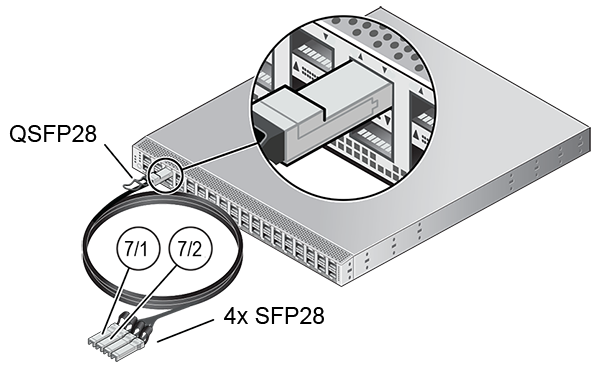
When the cable connections are in place, the administrator must configure the flex network in the Service Enclave, to enable traffic between the connected system and the Private Cloud Appliance environment. See Creating and Managing Flex Networks.