Overview of Compute Cloud@Customer
Use Compute Cloud@Customer to deploy Oracle Cloud Infrastructure services on-premises, to meet data sovereignty and regulatory requirements, while using OCI's identity and governance services to manage access to them.
With a Compute Cloud@Customer subscription, you maintain absolute control over your data while leveraging the capabilities of Oracle Cloud Infrastructure managed by Oracle. The Compute Cloud@Customer rack is installed in your data center, connected to your Oracle Cloud Infrastructure tenancy, and fully managed by Oracle.
Compute Cloud@Customer is engineered to deliver a comprehensive suite of cloud infrastructure services within the secure environment of your on-premises data center. The system integrates all required hardware and software components, and has been tested, configured and tuned for the best performance by Oracle engineers. It's a flexible, general purpose IaaS (Infrastructure as a Service) solution in the sense that it supports a wide variety of workloads. Its pluggable platform provides an excellent foundation to layer PaaS (Platform as a Service) and SaaS (Software as a Service) solutions on top of the infrastructure.
The cloud operations team uses best-in-class operational processes to secure and monitor the underlying cloud infrastructure. The cloud operations team is responsible for ongoing maintenance of the IaaS platform (upgrades and patching), incident management, and monitoring with OCI-native services.
Oracle installs and initializes the Compute Cloud@Customer infrastructure in your data center. Oracle continues to monitor and maintain the infrastructure over the lifespan of the service.
OCI Connection
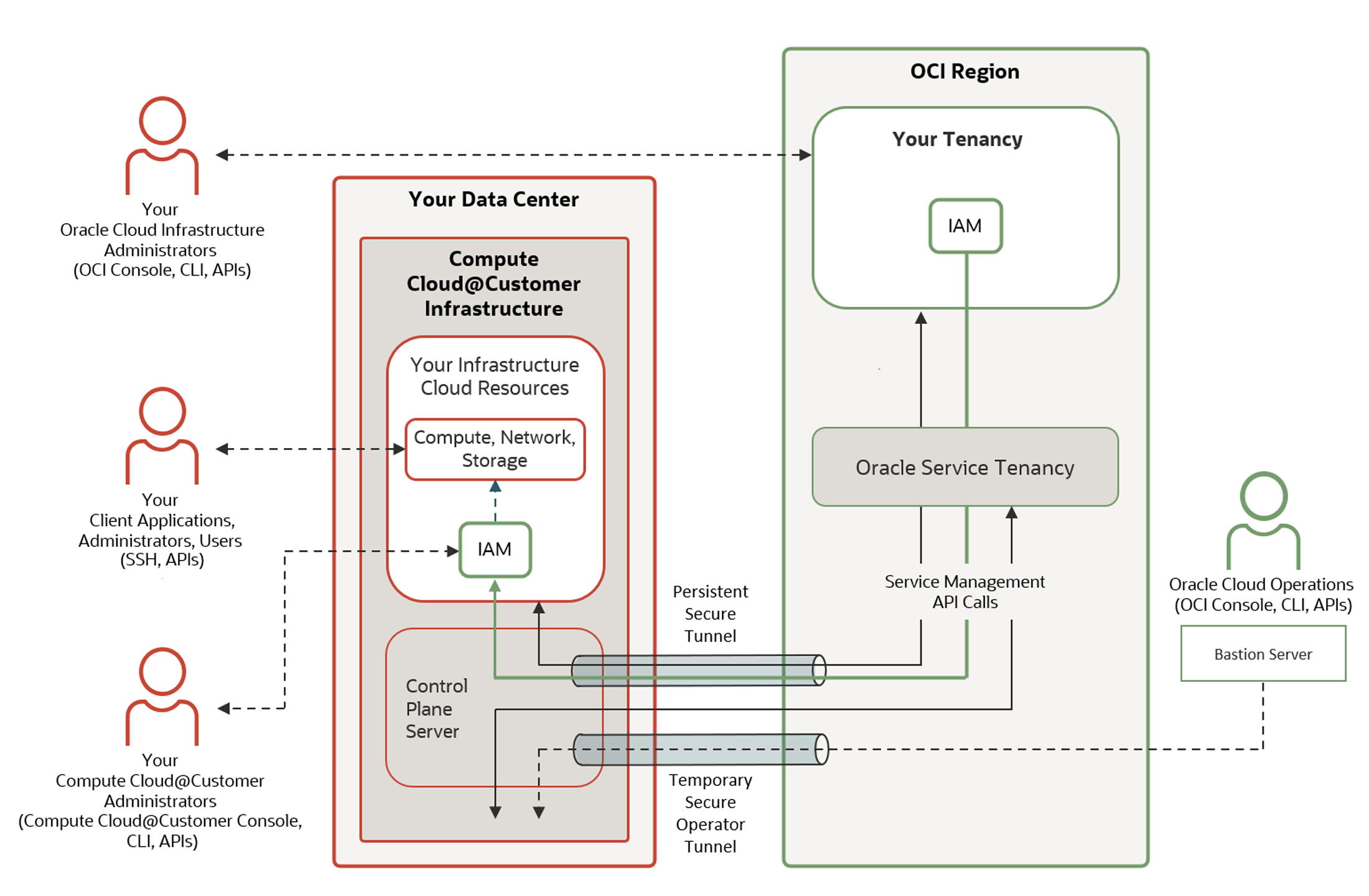
The following diagram shows how Compute Cloud@Customer infrastructure is securely connected to your tenancy in an Oracle Cloud Infrastructure region over an uninterruptible network. The connection is persistent. The system can tolerate short interruptions in network connectivity, but such interruptions are treated as faults and must be resolved as quickly as possible.
Disconnected State
In case connectivity with OCI is lost, certain functions are temporarily unavailable.
Preserved functionality:
-
Access to all cloud resources on the system, including compute instances, application and network load balancers, OKE clusters, container instances
-
Full lifecycle management (create, update, delete, stop, start, terminate) of cloud resources on the system
-
Continued access through the Console, OCICLI, and infrastructure as code automation (such as Terraform), for using and managing the cloud resources on the system
-
OCPU scaling
-
Direct instance management through standard OS tools
Suspended functionality:
-
All lifecycle management operations for IAM resources, including users, groups, policies, compartments, tagged namespaces
-
Infrastructure management
-
Service management through OCI interfaces: browser UI, OCI CLI, REST API/SDK, Terraform
-
Oracle infrastructure monitoring, including security monitoring
-
Oracle Cloud Automation access for scheduled tasks, for example patching or upgrade
-
Oracle Cloud Ops access for remedial and security responses
Authentication
Compute Cloud@Customer uses the same federated identity provider that you use for Oracle Cloud Infrastructure to manage Console sign ins. See Federated Identity Providers (IAM in OCI).
IAM Resources
Your Oracle Cloud Infrastructure IAM resources are regularly and securely cached in the Compute Cloud@Customer infrastructure. This enables you to manage IAM resources in one location. If you change IAM resources in the OCI tenancy, the changes are automatically applied to resources in Compute Cloud@Customer. See Identity and Access Management (IAM).
User Interfaces
You use the Oracle Cloud Infrastructure Console, CLI, and APIs to manage the following items:
- Initial connection of the Compute Cloud@Customer infrastructure to your tenancy in Oracle Cloud Infrastructure.
- Schedules for when Oracle can upgrade Compute Cloud@Customer.
- Identity and Access Management (IAM), including users, groups, policies, compartments, and tags.
- Billing and payment information.
- Oracle's access to Compute Cloud@Customer using Oracle Operator Access Control.
To manage resources such as VCNs, instances, and storage, on Compute Cloud@Customer, use the following interfaces:
-
OCI API (Compute Cloud@Customer supports a subset of operations)
-
OCI CLI (Compute Cloud@Customer supports a subset of operations)
-
Compute Cloud@Customer Console – a browser UI that offers a similar user experience to the Oracle Cloud Console.
For information about accessing your resources, see Accessing Compute Cloud@Customer User Interfaces.
Cloud Resources
When you sign in to Compute Cloud@Customer, you can create and manage the same types of resources that you can create in Oracle Cloud Infrastructure:
-
Instances: You can select the most appropriate type of instance for your applications based on characteristics such as the number of CPUs, amount of memory, and network resources. You can deploy the instance with any of the provided platform images, or bring your own image. See Compute Instances and Images for Compute Cloud@Customer Instances.
-
Virtual Cloud Networks (VCNs): A virtual version of a traditional network, including subnets, route tables, and gateways, on which your instance runs. At least one cloud network must be set up before you create instances. For information about setting up cloud networks see Virtual Cloud Networks.
-
Block Volumes: Lets you dynamically provision and manage block volumes that you can attach to one or more compute instances. See Block Volume Storage.
-
File Storage: A durable, scalable, secure, enterprise-grade network file system that you can connect to from any compute instance in your virtual cloud network (VCN). See File Storage.
-
Object Storage: A high-performance storage platform that lets you store unstructured data of any content type. This storage is regional and not tied to any specific compute instance. See Object Storage.
Upgrades
System upgrades are designed for minimum disruption and maximum availability. Health checks are performed before an upgrade to ensure that all components are in an acceptable state. The upgrade process is modular and only upgrades components – such as firmware, OSs, containerized services, or the system's main database – as needed. Oracle performs all upgrades, but you can determine the upgrade time frame.