Object Storage
Using the Object Storage subject area, you can create reports about buckets.
With these reports, you can seamlessly monitor and analyse data usage, storage trends, and operational metrics for Oracle Cloud Object Storage resources.
Business Questions
The subject area can answer the following business questions:
- What buckets do we have by tenancy, region, and compartment?
- Which new buckets appeared this week/month, and which were deleted?
- Which buckets are empty, archival only, or high growth?
- For every bucket, who owns it, and which cost center / application does it map to?
- Which buckets are missing required tags (owner, app, environment, data classification)?
- Do we have orphaned buckets with no clear owner?
- Which buckets are public (any path), and which are internet-exposed despite policy?
- Which "public" buckets are on an approved exception list (such as website/CDN origins)?
- Where is Block Public Access disabled?
- Which buckets have permissive policies/ACLs?
- Which buckets lack encryption or aren't using the required KMS key (CMK)?
- Are we compliant with PCI/HIPAA/SOX/internal controls (encryption, MFA delete, object lock)?
- Which buckets contain regulated/PII data (by tag/classification) and fail controls?
- Which buckets lack lifecycle policies (transition/expiration) despite long-lived data?
- Which buckets could move to cheaper storage classes based on access patterns?
- Which production buckets lack versioning, replication (SRR/CRR), or backup posture?
- Where is Object Lock or legal hold required and correctly configured?
- Which "tier-0"/critical applications have single-region storage risk?
Logical Model
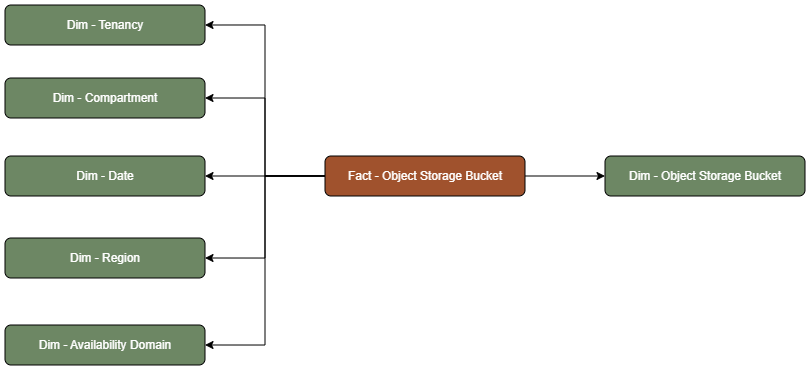
The Object Storage subject area is based on a relationship-driven logical model.
An Object Storage Bucket fact table is connected to the following dimension tables:
Metric Details
The fact folders in this subject area show the following metrics:
| Metric | Description |
|---|---|
| Object Count | This metric is calculated as the sum of total number of Objects created. |
| Total Size Bytes | This metric is calculated as the sum of total number of Bytes in use. |