Kubernetes Engine (OKE)
Using the Kubernetes Engine (OKE) subject area, you can create reports about the OKE instance.
With these reports, you can seamlessly monitor and analyze data from Kubernetes clusters, nodes, and virtual nodes running on OKE.
Business Questions
The subject area can answer the following business questions:
- What OKE clusters are currently deployed across my tenancy and compartments?
- Where (compartment, region) is each OKE cluster located?
- What is the current lifecycle state of each OKE cluster (for example, active, creating, deleting, updating, failed, and so on)?
- What are the key configuration details for each OKE cluster (for example, version, shape, display name, creation date, VCN/subnet assignment)?
- Which node pools are configured for each OKE cluster, and what are their characteristics (for example, number of nodes, shape/size, state, image version)?
- Which VCNs, subnets, and network resources are associated with each OKE cluster and node pool?
- What add-ons or extensions (for example, logging, monitoring, service mesh) are enabled on each OKE cluster?
- When was each OKE cluster and node pool created, last updated, or upgraded?
- Are there any OKE clusters, node pools, or associated resources in error or deprecated states?
- What changes (additions, deletions, updates) have recently occurred for my OKE clusters and node pools?
Logical Model
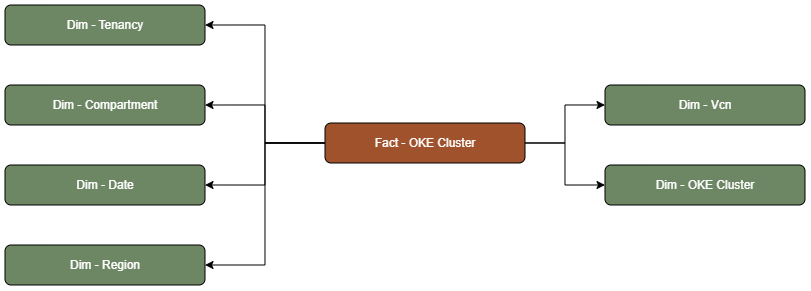
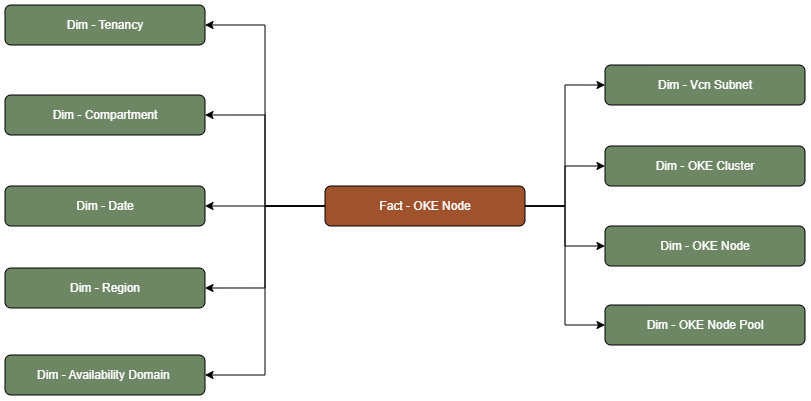
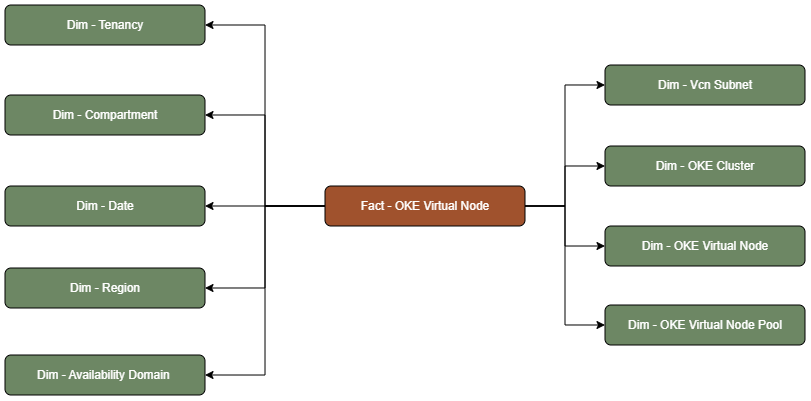
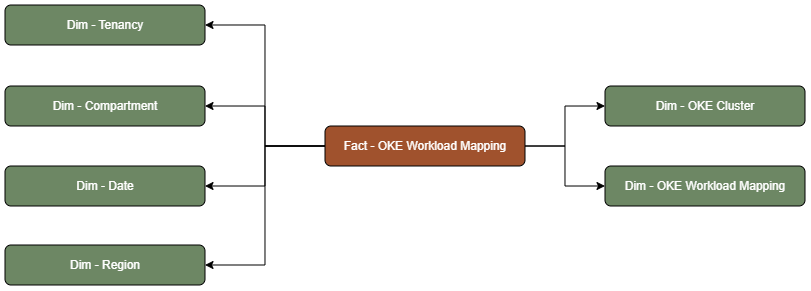
The OKE subject area is based on a relationship-driven logical model.
An OKE Cluster fact table is connected to the following dimension tables:
An OKE Node fact table is connected to the following dimension tables:
An OKE Virtual Node fact table is connected to the following dimension tables:
An OKE Workload Mapping fact table is connected to the following dimension tables:
Metric Details
The fact folders in this subject area show the following metrics:
| Metric | Description |
|---|---|
| Node Count | This metric is calculated as the sum of total number of Nodes attached. |
| Node Pool Count | This metric is calculated as the sum of total number of Node Pools attached. |
| Virtual Node Count | This metric is calculated as the sum of total number of Virtual Nodes attached. |
| Virtual Node Pool Count | This metric is calculated as the sum of total number of Virtual Node Pools attached. |
| Workload Mapping Count | This metric is calculated as the sum of total number of Workload Mappings attached. |