How Batch Objects Work Together
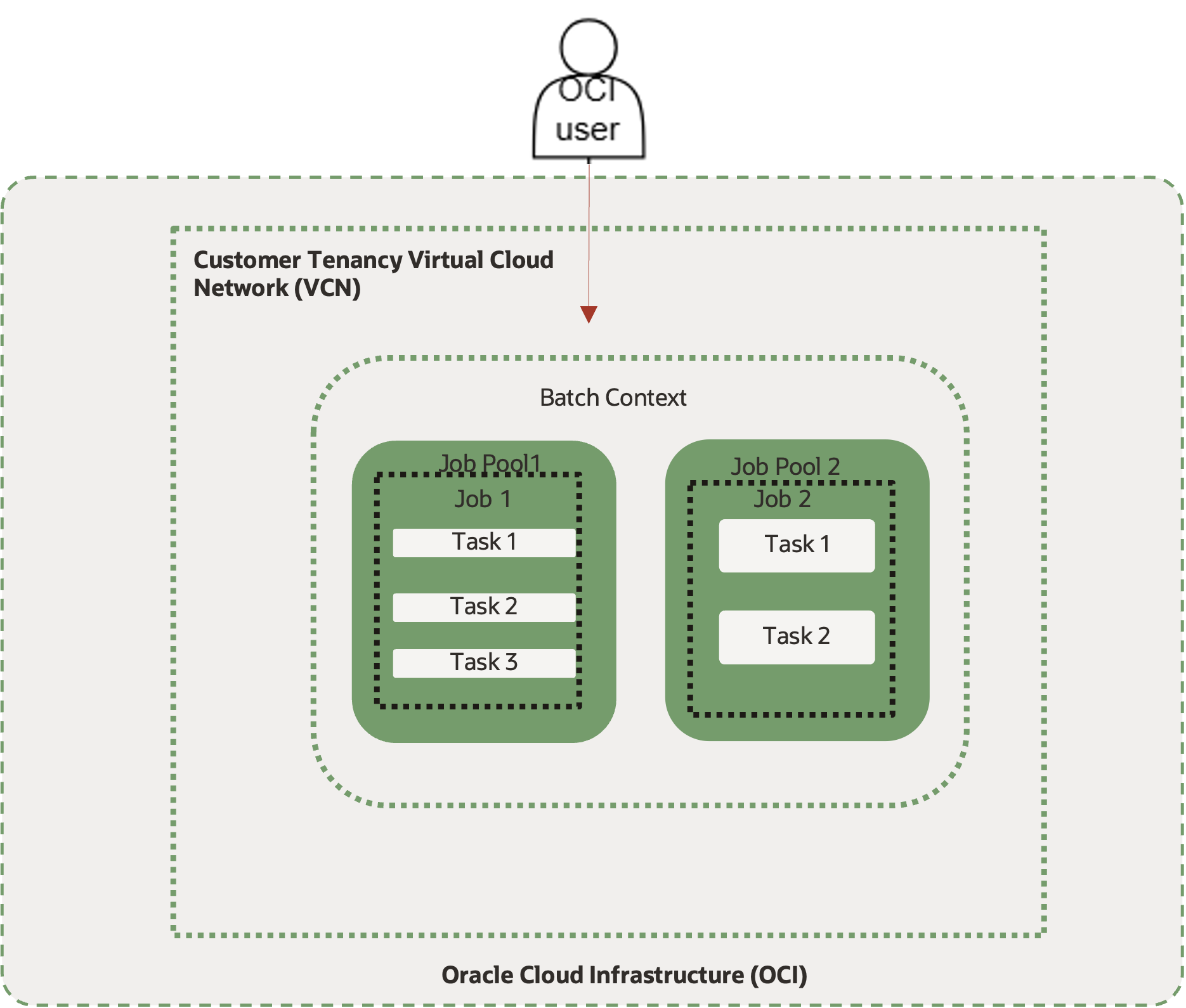
OCI Batch uses a hierarchy of resources to define, group, and run large-scale workloads. Each object has a specific role, from grouping jobs to defining how tasks run. To set up and manage batch jobs efficiently, you must understand how these objects work together.
Key Relationships Among OCI Batch Objects
- Batch Context: A batch context is the top-level container for your workloads. It includes everything jobs need to run, such as network settings, fleets, entitlements, logs, and job prioritization rules. Use different batch contexts to isolate workloads. For more information, see Managing Batch Contexts.
- Job Pools: Each batch context organizes jobs into job pools. Job pools group related jobs, making it easier to manage and prioritize them. Use job pool tags to prioritize jobs within a job pool and to help with access control and scheduling. For more information, see Managing Job Pools and Configuring Job Prioritization.
- Jobs: Jobs represent a set of related work within a job pool. Each job acts as a logical group for one or more tasks. Jobs are prioritized in their job pool using job pool tags and job tags applied during the job pool or job creation process. Job prioritization determines which jobs are executed first based on prioritization rules in the batch context. For more information, see Managing Jobs and Configuring Job Prioritization.
- Tasks: Tasks are individual units of execution within a job. You define tasks when you create a job. For more information, see Creating a Job. Each task includes the following components:
- Task Environment: The task environment defines the runtime environment for the task, including the container image, execution user and group settings, and required NFS volume mounts. Task environments are reusable. You can define a task environment once and assign it to multiple tasks. For more information, see Managing Task Environments.
- Task Profiles: Task profiles specify the minimum compute resources required for a task. Task profiles are reusable and help standardize resource requirements across tasks. For more information, see Managing Task Profiles.
- Entitlement Claims: Entitlements are used to control limited resources, such as software licenses. Create entitlements to represent the resources you have. When you assign an entitlement to a task, the task runs only if an entitlement slot is available. Running a task uses one slot, which is released when the task finishes. Entitlements don't connect to license servers. They enforce the maximum number of concurrent tasks using the specified limit.
- Task Dependencies: Dependencies specify execution order to ensure that prerequisite tasks finish before dependent tasks start.
- Group tasks: A task group is a container that holds a set of related tasks. Other tasks at the same level in the directed acyclic graph (DAG) treat the group as a single unit of work. All tasks within a group task must succeed or the group task fails.
- Group Tasks and Dependencies
-
A job contains tasks connected by dependencies that form a directed acyclic graph (DAG).
A DAG is a way to define and run a batch job as a set of tasks with explicit dependencies, where:
- Directed: Each dependency has a direction (task A must finish before task B starts).
- Acyclic: The graph has no cycles, so there's no circular dependency.
A group task lets you treat several tasks as a single step in the DAG.
-
- Group Task Behavior
- From outside the group, a group task acts as a single task. Other tasks can depend on it.
- From inside the group, a group task contains its own set of tasks and dependencies.
- The group task succeeds only if all its internal tasks succeed. If an internal task fails, the group task and any other tasks which depend on the group task will fail.
- Nested Group Tasks
- You can nest group tasks up to four levels deep.
- Use nesting to model stages such as "Prepare," "Render," and "Validate" that must complete before later steps start.
- Group Tasks and Dependencies
- Fleets Assignment: A fleet represents the OCI Shape configuration used to run tasks assigned to it. When a task is ready for execution, Batch schedules it to an available compute fleet that matches the resource requirements (OCPUs and RAM) specified in the task profile, according to the defined fleet assignment policy. For more information, see Fleet Assignment Policies in the Matching Tasks to Fleets topic.
- Job Prioritization: Job prioritization determines which jobs and tasks run first if several jobs compete for resources. Batch handles prioritization using tags and weights you configure in the batch context. Jobs inherit, and can override priorities from their job pool. Admins can set policies so urgent projects run ahead of lower-priority jobs. You can apply tags when you submit jobs or set up pools. Batch uses these settings to rank jobs in the queue according to the current batch context's rules. Set job prioritization when you create a batch context. For more information, see Managing Batch Contexts and Configuring Job Prioritization.
High-Level Batch Workflow
- Prepare Images and External Resources: To start, build and push your container images to Oracle Cloud Infrastructure (OCI) Registry. Set up the required file storage in advance, and ensure you have the correct permissions to access storage and container images. Having all necessary images and external dependencies organized upfront ensures smooth execution of your batch jobs.
- Set up Logging and Networking: Next, create log groups and the required logs. Configure your Virtual Cloud Network (VCN) and subnet access so batch jobs can securely communicate with other OCI resources.
- Define Environment: Define the environment in which each job runs. You can create batch contexts to keep different workloads isolated, prioritize jobs within your tenancy, and manage resources for various projects.
- Define Task Profile: Create task profiles to define the minimum hardware requirements for your tasks, such as OCPUs, memory, and disk space. By specifying these settings, you ensure tasks are scheduled on appropriately sized compute fleets, which optimizes resource usage and cost. Task profiles are essential for fleet assignment policies, allowing Batch to match each task with the best-fit resource configuration based on its needs.
- Create Batch Context: Set up a batch context as the top-level container for organizing and managing your jobs. Define networking, logging, fleet, and entitlement settings that the workload requires.
- Create Job Pools: Create job pools within each batch context to keep related jobs together and isolate workloads as needed. You can apply authorization policies for user access and map specific resources to different projects or teams within job pools. Use job pool tags to set the priority of jobs within each pool.
- Define Jobs: Jobs are the core units of batch processing. You submit them to specific job pools for execution. Each job consists of one or more tasks that need to be completed. Jobs are tagged with priority levels for dynamic adjustment during execution, which ensures critical jobs receive the necessary resources.
- Define Tasks: Define individual tasks within each job. Tasks are the basic computational steps required for workflow completion. Each task is defined by a compute task, which specifies the command to be executed, the environment, and the task profile. Each task runs in a batch task environment that includes everything it needs to execute, such as the container image and any required volume mounts. It's also linked to a task profile, which ensures the task is matched with the correct fleet by defining the minimum CPU and memory it needs.
- Run and Monitor: Submit jobs and track progress using the job dashboard.