Enterprise AI Agents in OCI Generative AI
OCI Generative AI provides two main approaches for building enterprise-grade agents, and you can also combine them in a hybrid architecture.
The two approaches are:
- Build agents with OCI Responses API
- Deploy hosted agentic applications in OCI Generative AI
These options let you start with a simple API-first approach, move to hosted deployments when you need them, or combine both in the same architecture.
For workflows that also need to run code or shell commands, use sandboxes to provide temporary, isolated execution workspaces.
Approach 1: Build Agents with the OCI Responses API
Use the OCI Responses API when you want a flexible, API-first way to build agents without managing infrastructure yourself.
The OCI Responses API is the primary API for agentic workflows in OCI Generative AI. It is OpenAI-compatible, which means you use the same request syntax and request patterns as the OpenAI Responses API. However, the base URL points to OCI Generative AI, authentication uses OCI Generative AI credentials, and requests are processed through OCI Generative AI in OCI regions.
This approach is useful when you want to build agents quickly while keeping model execution, tool use, and supporting services OCI-managed.
What the Responses API supports
With the OCI Responses API, you can:
- Select from supported OCI-offered models in supported OCI regions.
- Use an OpenAI-compatible API format with OCI authentication and OCI-managed execution.
- Build single-step or multi-step agent workflows.
- Add conversation context for multi-turn interactions.
- Use Responses API supported tools such as File Search, Code Interpreter, Function Calling, and MCP Calling.
- Integrate foundational APIs such as Files, Vector Stores, and Containers into the same workflow.
Conversations and memory
The Responses API works with the Conversations API so you can keep context across turns in a multi-turn conversation.
OCI Generative AI also provides a resource called projects. A project groups related agent resources, such as responses, conversations, files, containers, and memory settings.
Within a project, you can configure memory behavior, including:
- Long-term memory for persistent context across related interactions in the same project
- Short-term memory for context carried forward within an ongoing conversation
This lets you organize related agent workflows and manage retained context in a controlled way.
Tools with the Responses API
Tool support is part of the Responses API. When you send a Responses API request, you can include supported tool definitions directly in the request.
OCI Generative AI supports the following Responses API tools:
- File Search
- Code Interpreter
- Function Calling
- MCP Calling
These tools expand what the model can do during a workflow. As OCI Generative AI expands support for more Responses API tools, this set can grow.
Foundational APIs with the Responses API
If a workflow needs lower-level building blocks, you can use foundational APIs together with the Responses API.
These foundational APIs include:
- Files
- Vector Stores
- Containers
These APIs are also OpenAI-compatible and work seamlessly with the Responses API. You can use them to support retrieval, document handling, sandboxed execution, and other agent workflow needs.
Enterprise AI NL2SQL
OCI Generative AI also provides Enterprise AI NL2SQL for agentic workflows. NL2SQL converts natural-language requests into validated SQL for federated enterprise data without moving or copying the underlying data. The source data must be stored in Oracle Autonomous AI Database. NL2SQL uses a semantic enrichment layer to map business terms to database tables, columns, and joins.
NL2SQL generates SQL only and doesn't run the query. To use it, you create a Semantic Store backed by a structured-data vector store, configure the required connections, run enrichment, and then call the GenerateSqlFromNl API. Query execution is handled separately through the DBTools MCP Server, which authorizes and runs the query against the source database by using existing permissions and guardrails.
Why use this approach
Use the Responses API approach when you want:
- A quick start for building agents
- OCI-managed execution without managing infrastructure
- OpenAI-compatible request syntax
- Flexible support for models, conversations, tools, and foundational APIs
- An API-first architecture that can grow with your application
- Access to other OCI agent capabilities such as NL2SQL for enterprise data workflows
In short, this approach gives you a fast and flexible way to build agents while OCI Generative AI manages the underlying execution environment.
Approach 2: Deploy Hosted Agentic Applications
Use hosted applications when you want to package and deploy your own agent runtime in OCI Generative AI.
In this approach, OCI Generative AI provides a managed hosting model built around two resources:
- Applications
- Deployments
An application defines the hosted application configuration. A deployment runs a specific container image for that application.
This approach is useful when you already have an agentic application that you want to package, deploy, and run on OCI-managed infrastructure.
What you set up in an application
When you create an application, you define the core hosting configuration for the agentic application.
This includes settings such as:
- Deployment scaling behavior to handle load
- Whether the application uses managed storage
- Which managed storage services the application uses:
- File Storage
- OCI PostgreSQL
- OCI Cache
- Oracle Autonomous Database
- The VCN and subnet for the application
- Whether the application uses public or private endpoints
- The authentication option: identity domain bearer token, identity domain browser session, OCI IAM, or no platform-managed authentication. See Authentication.
OCI IAM application integration
For identity domain bearer token or browser session authentication, configure an application in an OCI identity domain.
This OCI identity domain application is a registered custom application in Oracle Cloud Infrastructure Identity and Access Management (OCI IAM). It controls user access and supports secure integration, single sign-on (SSO), and identity propagation by using OAuth protocols.
How deployments work
After you create the application, you create a deployment inside that application.
A deployment uses the configuration defined by the application and points to a specific container image that you build and push to OCI Container Registry.
The typical flow is:
- Build your container image
- Push the image to OCI Container Registry
- Create an application in OCI Generative AI
- Create a deployment in that application
- Point the deployment to the container image
- Run the deployment and make it active
The active deployment serves requests through the application endpoint.
Why use this approach
Use hosted applications when you want:
- To run your own packaged agent runtime in OCI
- OCI-managed infrastructure for hosting and scaling
- Managed networking, storage, and identity integration
- A deployment model built around container images and OCI Container Registry
- A production hosting option for agentic applications
This approach is designed for hosting agentic applications on OCI-managed infrastructure with built-in support for deployment and auto-scaling.
Hybrid Approach
Because both approaches are available, you can also use a hybrid approach.
In a hybrid architecture, you use the Responses API for model orchestration, conversations, tools, foundational APIs, and supporting capabilities such as NL2SQL, while also using hosted deployments for custom agent runtimes that you package and operate in OCI.
For example, you might:
- Call the OCI Responses API for model interaction and tool use
- Use Conversations API and project-based memory for context handling
- Use Files, Vector Stores, and Containers as part of the workflow
- Use NL2SQL for natural-language-to-SQL generation against federated enterprise data
- Deploy a custom agent runtime as a hosted application
This lets you combine OCI-managed agent capabilities with packaged application components that you want to run in OCI.
Run Code in Sandboxes
A sandbox provides a managed Linux workspace with its own filesystem, network namespace, and process space. Your application creates the sandbox, uploads files, runs commands, collects results, and stops the runtime when finished.
Sandboxes belong to a Generative AI project, which holds their shared networking configuration. Use a sandbox ID to address the same running workspace across workflow steps. Select a compute shape and expiration duration for each sandbox, and use snapshots to save files for a new sandbox.
A hosted application can coordinate work across sandboxes while keeping workflow state and final results in durable storage. For setup and operations, see Sandboxes in OCI Generative AI.
Decide Which Approach Fits Your Use Case
Use the Responses API approach when you want the fastest and most flexible way to build agents with OCI-managed model execution, conversations, tools, foundational APIs, and supporting capabilities such as NL2SQL.
Use hosted applications when you want to package and deploy your own agent runtime and run it on OCI-managed infrastructure.
Use a hybrid approach when your architecture benefits from both models.
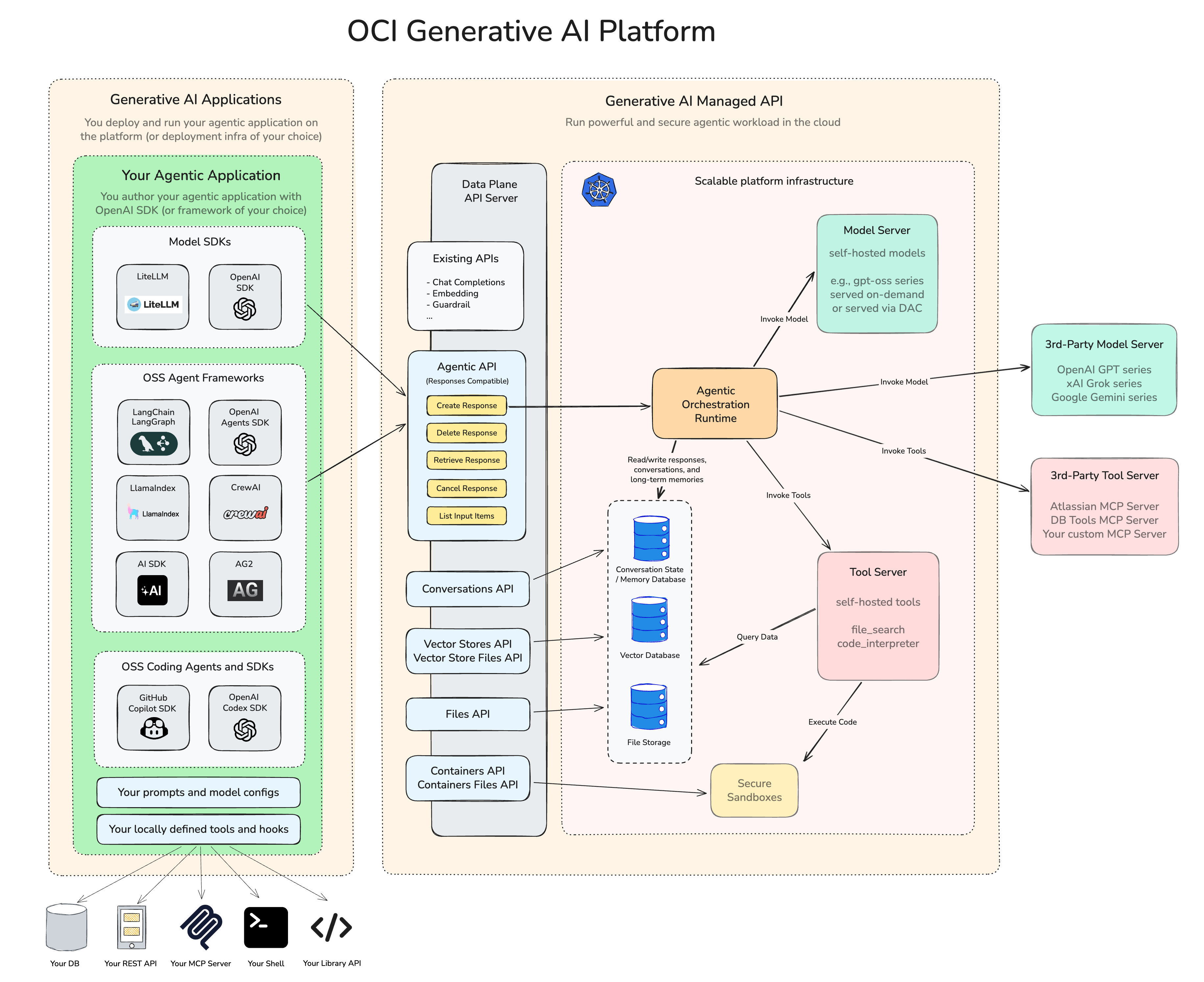
Diagram
The diagram shows how these pieces fit together. On one side is the client or agent application, including SDK, frameworks, prompts, model settings, and local tools. In the middle are the managed OCI API and resources, including the OCI Responses API, memory, Files, Vector Stores, Containers, and related tool capabilities. On the other side is the OCI-managed runtime and infrastructure used to run models, tools, and hosted workloads, while integrating with OCI services and third-party systems.