ODB Peering Connection
An ODB peering connection allows to set up a peering connection between ODB Network and a VPC which enables applications to connect to your Exadata Database.
A VPC can establish multiple peering connections to different ODB Networks, but only one peering connection to each ODB Network. You can create an ODB peering connection in the same AWS account as the ODB Network, or in a different AWS account after the ODB Network has been shared using AWS RAM.
For more information, review the ODB Network Design and Network Topologies documentation:
- Multiple VPCs to one ODB Network – Connect multiple application VPCs to a single ODB Network.
- One VPC to multiple ODB Networks – Connect a single application VPC to multiple ODB Networks.
Before implementing this architecture, consider the following:
- An ODB network supports up to 95 peering connections. To increase the limit to 125 peering connections, contact AWS Support by opening a support case. For more information, see Requesting a Limit Increase.
- CIDR blocks must not overlap between the ODB Network and peered VPCs to avoid routing conflicts.
- Supernet CIDR blocks grouping multiple existing subnets are not supported in peered configurations.
- ODB Networks in US East (N. Virginia) and US West (Oregon) created before February 7, 2026, require a network upgrade before adding more than one ODB peering. To upgrade, contact Oracle Cloud Support or your Oracle representative to have the existing ODB Network updated.
There are prerequisites that must be completed before creating an ODB peering connection. Complete the following steps:
- Create an ODB Network
- Create a VPC
Note:
-
Ensure that the ODB network and VPC are not already peered with the each other.
-
Creating peering VPC and ODB network in different availability zone(s) (AZ) are supported.
-
Modify the ODB peering network CIDR in the ODB peering connection.
-
From the Oracle AI Database@AWS dashboard , select the ODB peering connections button.
-
Select the Create ODB peering connection button to start the creation process.
-
Enter an unique name in the ODB peering name field.
Note
Note: The ODB peering name can be up to 255 characters. It must start with a letter or underscore (_) and cannot contain two successive hyphens(-). It can include the following characters: a-z, A-Z, 0-9, underscore (_), and dash (-). -
From the dropdown list, select the ODB network.
-
From your Peer Network dropdown list, select your VPC that you want to pair with your ODB network.
-
The Peer networks CIDRs field is optional. Select the Add new CIDR button to add peer network CIDRs.
-
If you want to assign a tag to your AWS resources, you can select the Add new tag button, and then enter a key and a value. This step is optional.
-
Review the information you entered, and then select the Create ODB peering connection button.
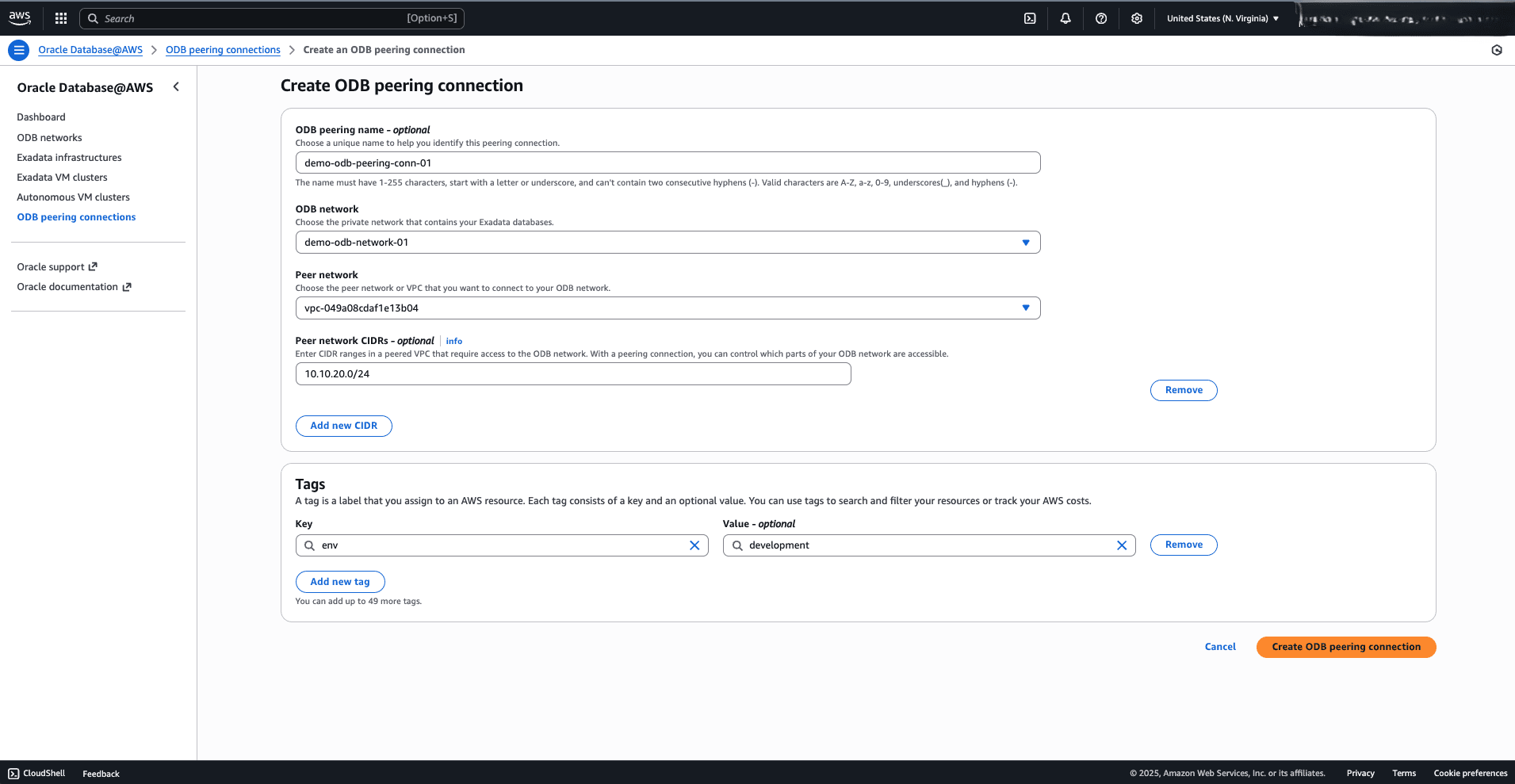
-
Once the creation of the ODB peering connection is successful, you will see the success message.
-
You can also monitor the status of the provisioning and, once the ODB peering connection is active, review its details from the ODB peering connections list.
-
Once the ODB peering connection is created, you can view the details of it from the ODB peering connections list on the Oracle AI Database@AWS dashboard.
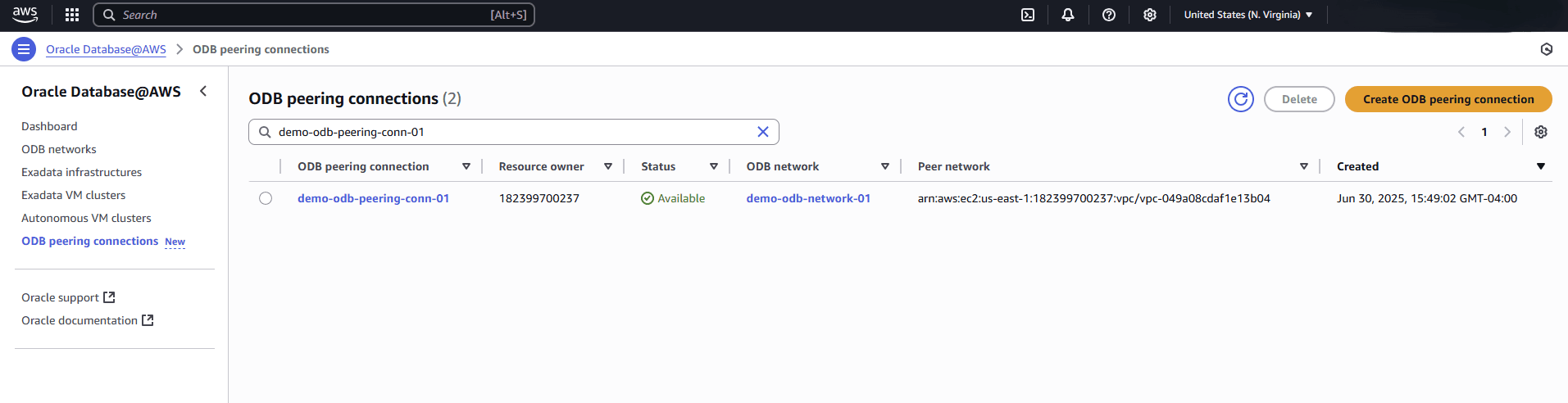
-
ODB peering connection creation is only available through the AWS Console and AWS CLI.
There is currently no content for this page. Oracle AI Database@AWS team intends to add content here, and this placeholder text is provided until that text is added. The Oracle AI Database@AWS team is excited about future new features, enhancements, and fixes to this product and this accompanying documentation. We strongly recommend you watch this page for those updates.
ODB peering connection creation is only available through the AWS Console and AWS CLI.
You can provision an ODB peering connection in AWS using the Terraform Provider hashicorp/aws (version 6.15.0 or higher).
Prerequisites
- Terraform or OpenTofu installed
- AWS credentials configured
- HashiCorp AWS provider version >= 6.15.0
- Provision of an ODB Network and a VPC
# Prerequisites: Application VPC with a Workload Subnet for ODB Peering Connection
module "app_vpc" {
  source     = "aws-ia/vpc/aws"
  version    = "4.5.0"
  name       = "tf-vpc-demo"
  azs        = ["us-west-2c"]
  cidr_block = "10.30.0.0/16"
  subnets = {
    workload = {
      cidrs = ["10.30.1.0/24"]
    }
  }
}
Sample Terraform Configuration
locals {
  # IDs of depending resources
  peer_network_id = module.app_vpc.vpc_attributes.id
  odb_network_id  = aws_odb_network.this.id
}

# Create a Peering Connection between the ODB Network and the VPC
resource "aws_odb_network_peering_connection" "this" {
  # Optional explicit dependencies
  depends_on = [ aws_odb_network.this, module.app_vpc ]

  # Required Arguments
  odb_network_id  = local.odb_network_id
  peer_network_id = local.peer_network_id
  display_name    = "tf-odb-peering-conn-demo"

  # Optional Arguments
  region          = "us-west-2"
  tags            = {
    created_via  = "terraform"
    env        = "demo"
  }
}
For detailed configuration options, see aws_odb_network_peering_connection.
Reference Implementation
To review examples of integrated Terraform solutions, see the terraform-oci-multicloud-aws GitHub repository.
What’s Next?
Create an Exadata Database or Autonomous AI Database (Dedicated).