Scenario E: Connecting Two Tenancies with Overlapping IP Addresses
Learn how to connect two Oracle Cloud Infrastructure (OCI) tenancies when both use overlapping IP addresses. The solution uses NAT (Network Address Translation) policies with Dynamic Routing Gateways (DRGs) and cross-tenancy Remote Peering Connection (RPC) attachments.
You can use this solution in the following scenarios:
- Two tenancies with Virtual Cloud Networks (VCNs) that use overlapping IP CIDR blocks and require connectivity.
- Two tenancies with a combination of overlapping on-premises and VCN IP CIDR blocks that require connectivity.
Highlights of using this solution include the following:
- Centralizes configuration and operations in large, multi-network environments by using NAT policies attached to DRGs with cross-tenancy RPCs.
- Applies to multiple DRGs within a tenancy and across several tenancies by assigning customized NAT policies to each DRG RPC attachment.
- Supports extension to other architectures, such as remote on-ramps, routing traffic through a central network virtual appliance, FastConnect with multiple DRGs and VCNs, and remote VCN peering.
- Enables both local and global connectivity. RPC attachments support intra-region and inter-region DRG connectivity.
We recommend that you use a CIDR block from the private IPv4 address ranges specified in RFC 1918 for your VCNs. Because these ranges are private, many organizations can use them, often resulting in overlapping address spaces when networks connect.
Renumbering networks to resolve conflicts is challenging and can cause downtime. While using public IPv4 address space can prevent overlap, public addresses are limited and increasingly expensive. Many organizations experience overlapping private IPs after mergers and acquisitions or when connecting to several service providers.
Common scenarios include:
- Mergers and Acquisitions: When organizations combine IT infrastructures, both might have independently chosen overlapping IP ranges.
- Service Provider Integrations:
- Clients in OCI VCNs: Service providers offering private services to multiple customers can experience overlaps.
- Clients with On-Premises Connectivity: When you use FastConnect or VPN, on-premises networks that were built without public cloud in mind can conflict with OCI VCNs or with each other.
A VCN is an isolated cloud network for your workloads. Multiple VCNs can use the same CIDR blocks for private IP space because NAT and Internet Gateway services translate those addresses for public access. Overlap is only a problem when private (non-NAT) connectivity is necessary between networks.
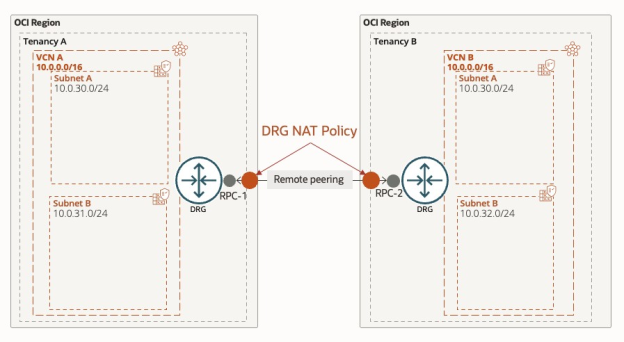
Example: Connecting Two Tenancies with Overlapping IP Address Usage
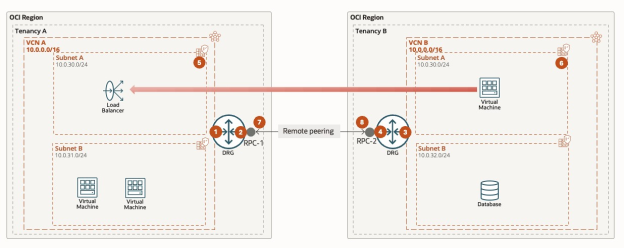
| Destination CIDR | Route target | Dynamic or Static? |
|---|---|---|
| 100.96.0.0/16 | RPC attachment | Static |
| Destination CIDR | Route target | Dynamic or Static? |
|---|---|---|
| 10.0.0.0/16 | VCN A attachment | Dynamic |
| Destination CIDR | Route target | Dynamic or Static? |
|---|---|---|
| 100.64.0.0/16 | RPC attachment | Static |
| Destination CIDR | Route target | Dynamic or Static? |
|---|---|---|
| 10.0.0.0/16 | VCN B attachment | Dynamic |
| Destination CIDR | Route target |
|---|---|
| 100.96.0.0/16 | DRG attachment |
| Destination CIDR | Route target |
|---|---|
| 100.64.0.0/16 | DRG attachment |
| Original Source | Translated Source | Original Destination | Translated Destination |
|---|---|---|---|
| 0.0.0.0/0 | 0.0.0.0/0 | 100.64.30.0/24 | 10.0.30.0/24 |
| Original Source | Translated Source | Original Destination | Translated Destination |
|---|---|---|---|
| 0.0.0.0/0 | 0.0.0.0/0 | 100.96.30.0/24 | 10.0.30.0/24 |
Implications of Peering
To understand important access control, security, and performance implications for peered VCNs, see Important Implications of Peering.
Peering VCNs in different tenancies has some permissions complications that need to be resolved in both tenancies. For details on the permissions needed, see IAM Policies for Routing Between VCNs.
Before You Begin
Before you set up DRG NAT policies for overlapping IP addresses, ensure each of the following:
- Each tenancy has a DRG provisioned.
- Each tenancy contains at least one VCN with overlapping IP ranges that require connectivity.
-
You have identified all overlapping IP networks and have shared this information between tenancy owners. For example: Both tenancies use the RFC 1918 range 10.0.0.0/16, overlapping at 10.0.30.0/24.
-
Each tenancy has a unique network address space defined for NAT translation. For example:
- Tenancy A: 100.64.0.0/16
- Tenancy B: 100.96.0.0/16
(These ranges come from RFC 6598 for CGNAT.)
- All necessary IAM policies are in place for creating and attaching cross-tenancy RPCs. For details, see IAM Policies for Routing Between VCNs.
- (Optional) Create and share DNS records for the translated address ranges so that remote tenancies can address resources by fully qualified domain names (FQDNs).
Task 1: Create a DRG Import Route Distribution in Tenancy A
- From the Navigation menu, select Networking.
- Under Customer connectivity, select Dynamic Routing Gateway.
- Select the DRG for cross-tenancy remote peering.
- Select Routing.
- Under Import route distributions, select Create import route distribution.
- Enter a name (for example, Route-Distribution-for-NAT-RT).
- Select Create import route distribution.
Task 2: Create a DRG Custom Route Table for Overlapping VCN Attachment in Tenancy A
- Using the same DRG, go to Routing and select Create DRG route table.
- Enter a name (for example, NAT-RT).
- Under Route table settings, enable Import route distribution.
- Select the route distribution created in Task 1 from the list.
- Select Create DRG route table.
Task 3: Attach the VCN to the DRG Using the Custom Route Table
- Within the same DRG, under Attachments, select Create virtual cloud network attachment.
- Enter a name (for example, Overlapping-IP-VCN-Attachment).
- In Virtual cloud network compartment, select the compartment for the VCN.
- For Virtual cloud network, select the VCN with IP overlap.
- Set VCN route type to VCN CIDR blocks.
Task 4: Repeat in Tenancy B
Repeat Tasks 1–3 in Tenancy B for its overlapping VCN.
Task 5: Create a NAT Policy in Tenancy A for the RPC Attachment
- In Tenancy A, from the Navigation menu, select Networking.
- Under Customer connectivity, select DRG NAT Policy.
- Select Create to make a new NAT policy.
- Add a NAT rule:
- Original Destination CIDR: Enter the unique Tenancy A range (for example, 100.64.30.0/24).
- Translated Destination CIDR: Enter the original overlapping CIDR (for example, 10.0.30.0/24).
- Priority: Enter 1.
- Select Create.
Task 6: Create a NAT Policy in Tenancy B for the RPC Attachment
Follow the same procedure as in Task 5, but use Tenancy B's unique range (for example, 100.96.30.0/24).
Task 7: Create the Cross-Tenancy RPC Peering Attachment
Follow the steps under Remote VCN Peering through an upgraded DRG, specifically tasks A, B, and C, to create the cross-tenancy RPC. Don't complete other steps here. Those steps are addressed later.
Task 8: Associate the DRG NAT Policy with the RPC Attachment
- For each tenancy, go to the DRG with the RPC attachment.
- On the Attachments tab, under Remote peering connection attachments, select the appropriate RPC attachment.
- Select Edit.
- For NAT policies, associate the DRG NAT policy created in Task 5 or Task 6.
- Select Save changes.
Task 9: Create a Static Route to the Unique B Network in Tenancy A
- In Tenancy A, open Dynamic Routing Gateway.
- Select the DRG with the cross-tenancy RPC.
- Under Routing, select the custom route table (for example, NAT-RT).
- Select Static route rules > Add static route rules.
- For Destination CIDR Block, enter Tenancy B's unique IP range (for example, 100.96.0.0/16).
- For Next hop attachment type, select Remote Peering Connection and select the correct attachment.
- Select Add route rules.
Task 10: Create a Static Route to the Unique A Network in Tenancy B
Repeat Task 9 in Tenancy B, using Tenancy A's unique IP range (for example, 100.64.0.0/16).
Task 11: Add Static Routes in VCN Subnet Route Tables
-
In Tenancy A: In each relevant subnet route table, add a static route:
- Target Type: Dynamic Routing Gateway (VCN’s DRG is selected automatically)
- Destination CIDR Block: Tenancy B’s unique network (for example, 100.96.0.0/16)
- Description: (Optional)
-
In Tenancy B: In each relevant subnet route table, add a static route:
- Target Type: Dynamic Routing Gateway
- Destination CIDR Block: Tenancy A’s unique network (for example, 100.64.0.0/16)
- Description: (Optional)
Task 12: Update Tenancy Security Rules
Update the security lists for each affected subnet to allow ingress and egress from the unique address ranges of the other tenancy. For more information, see Security Rules.