Network Path Analyzer
Learn about the Network Path Analyzer tool.
Overview of Network Path Analyzer
Network Path Analyzer (NPA) provides a unified and intuitive capability you can use to identify virtual network configuration issues that impact connectivity. NPA collects and analyzes the network configuration to decide how the paths between the source and the destination function or fail. No actual traffic is sent, instead the configuration is examined and used to confirm reachability.
NPA carefully examines routing and security configurations and identifies the potential network path the defined traffic traverses, along with information about virtual networking entities in the path. In addition to the path information, output of these checks includes how routing rules and network security features (security lists, NSGs, Zero Trust Packet Routing, and so on) allow or deny traffic. The sources and destinations could be within OCI, or across OCI and on-premises, or OCI and internet. NPA analyzes all the standard OCI networking elements with their associated configuration.
Using NPA, you can:
- Troubleshoot routing and security misconfigurations that are causing connectivity issues
- Validate that the logical network paths match intent
- Verify that the virtual network connectivity setup works as expected before starting to send traffic
To achieve any of these objectives, create a test that you think works and then run the test. You can also save this test definition to run it again later. Saved tests are displayed in the NPA page for you to select.
The following source and destination scenarios are supported:
- OCI to OCI
- OCI to on-premises
- On-premises to OCI
- Internet to OCI
- OCI to internet
Tests can be defined for the following parameters:
| Source options | Destination options | Protocol | Port Information | Bi-directional flag |
|---|---|---|---|---|
|
|
Any IP protocol supported in the current security list. |
Depending on the protocol type provided:
|
A bidirectional check flag, enabled by default for TCP and UDP. You have the flexibility to turn off this flag to check unidirectional connectivity and path (source to destination). This flag is disabled for non- TCP/UDP protocols. |
An analysis is done using a full configuration snapshot, but the resulting network path displayed is limited to the entities that you have permission to view. When you don't have the needed permission to view objects in the path, the test output doesn't show those objects or any further details.
NPA uses Batfish, an open source network configuration analysis library. NPA uses Batfish to perform reachability analysis and identify configuration errors.
If an endpoint has a Zero Trust Packet Routing (ZPR) security attribute, traffic to the endpoint must satisfy ZPR policies and also all NSG and security list rules. For example, if you're already using NSGs and you add a security attribute to an endpoint, all traffic to the endpoint is blocked. From then onward, a ZPR policy must explicitly allow traffic to the endpoint.
NPA helps identify problems with Zero Trust Packet Routing Security Attributes and Zero Trust Packet Routing Policy. See the linked documents for details on Zero Trust Packet Routing prerequisites and configuration.
Required Permissions
We recommend that you always set the following permissions policies at the tenancy level (setting these permissions at a compartment level can make the path analysis results less exact) to use Network Path Analyzer.
- User Permissions
- Configure the following permissions to grant users in the <group-name> user-group the ability to use NPA, where <group-name> is the name of the administrator group for networking resources.
allow group <group-name> to manage vn-path-analyzer-test in tenancy - Service PermissionsConfigure the following permissions to allow the NPA service to access resources and services within the tenancy for path analysis.
allow any-user to inspect compartments in tenancy where all { request.principal.type = 'vnpa-service' }
allow any-user to read instances in tenancy where all { request.principal.type = 'vnpa-service' }
allow any-user to read virtual-network-family in tenancy where all { request.principal.type = 'vnpa-service' }
allow any-user to read load-balancers in tenancy where all { request.principal.type = 'vnpa-service' }
allow any-user to read network-security-group in tenancy where all { request.principal.type = 'vnpa-service' }
allow any-user to read zpr-family in tenancy where all { request.principal.type = 'vnpa-service' }
Granting permissions to use this tool might lead to overexposure of information about network configuration and network security settings to a user of the tool. Observing reachability status can be used by a malicious user to infer the presence of network services and related routing and security information. Only give access to the tool to trusted users and administrators.
See the path-analyzer-test section of Details for the Network Monitoring Service for more details on NPA permissions.
Known caveats and limitations
The following NPA use cases are unsupported:
- Sources and destinations that are within the same subnet and with a different Private IP produce incorrect results.
- When a subnet's route table has a next-hop defined as a private IP, it might incorrectly show the status as No-Route.
- If LPGs are peered across tenancies, the response for the Path Analysis is Indeterminate.
- If RPC connections cross tenancies or regions, the response for the Path Analysis is Indeterminate.
- NPA doesn't support IPv6. IPv6 addresses can't be used as sources or destinations. IPv6 routing and security settings are ignored and don't affect the results.
- NPA doesn't detect routing loops, and if routing loops are present the results can be inconclusive or indicate a failure.
- Intra-VCN routing and internet gateway routing aren't yet supported in NPA and can cause inaccurate Path Analysis results.
- NPA doesn't function if the number of compartments in the tenancy requesting the Path Analysis is more than 100. For these tenancies you must raise a support request to use NPA.
- NPA can't evaluate ZPR policies if it's unable to reach the destination because of routing, Security List or Network Security Group related issue. In such cases, NPA displays a ZPR couldn't be evaluated notification.
- Setting a PSA endpoint as a source endpoint isn't supported. A PSA endpoint can only be a destination endpoint for path analysis.
Special use cases
When some entities are in the path for a path analysis and they're neither the source or the destination, the following behaviors are seen. You can use the indicated solution for these use cases, if one is available.
| Node in Path | NPA Outcome | Solution |
|---|---|---|
|
Network Virtual Appliance (NVA) |
Indeterminate |
Create two Path Analysis checks, one from the source to the NVA and one from the NVA to the destination. |
|
NLB deployed in non-transparent mode with SNAT configured |
No Route |
Create two Path Analysis checks, one from the source to the NLB and one from the NLB to the destination. |
|
Network Load Balancer in transparent mode |
Indeterminate |
Create two Path Analysis checks, one from the source to the NLB and one from the NLB to the destination. |
|
Load Balancer |
No Route |
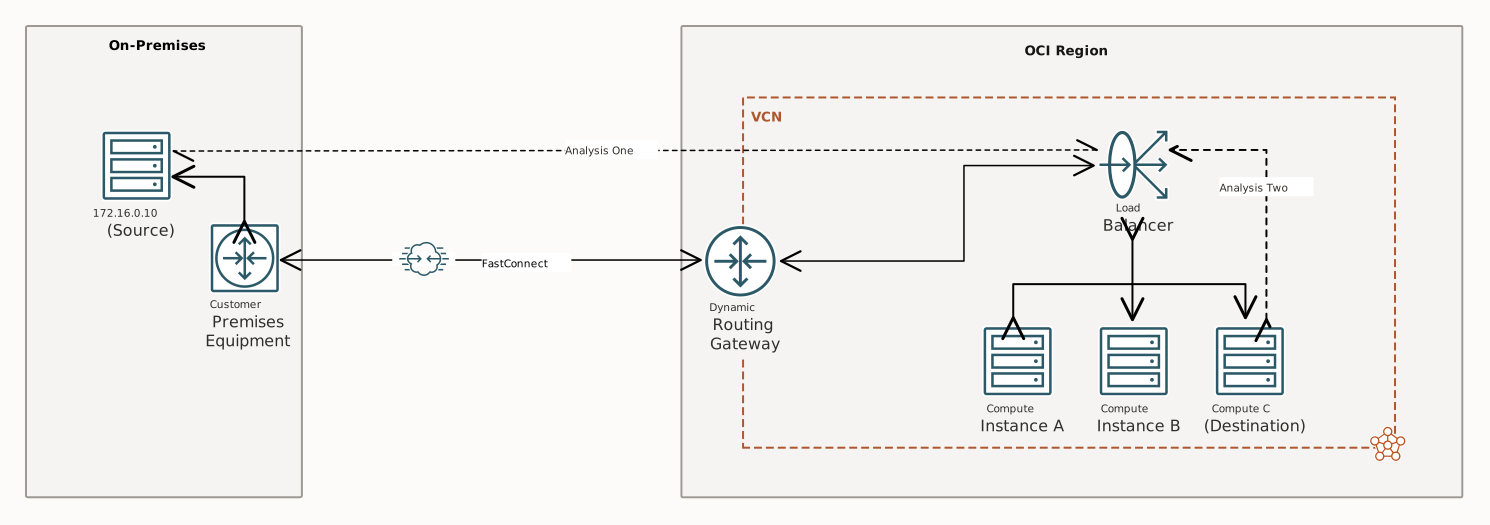
Create two Path Analysis checks, one from the source to the LB and one from the LB to the destination. |
|
FWaaS |
Indeterminate |
Create two Path Analysis checks, one from the source to the FWaaS and one from the FWaaS to the destination. |
| Cross-region using RPC |
Indeterminate |
Create two Path Analysis checks, one for each region. |
| Cross-tenancy using LPG |
Indeterminate |
Create two Path Analysis checks, one for each tenancy. |
| DRG v1 |
Indeterminate |
Upgrade to DRG v2. |
The following diagram shows one of the use cases where the path analysis must be split in two.
Network Path Analysis Work Requests
Use work requests to monitor long-running operations such as network path analysis tests. When you run such an operation, the service spawns a work request . A work request is an activity log that you can use to track each step in the operation's progress. Each work request has an OCID (Oracle Cloud Identifier) that you can use to interact with it programmatically and use it for automation. Work requests are retained for 12 hours.
Network Path Analyzer Tasks
You can perform the following tasks using the Network Path Analyzer tool: