Exploring Your GPU Memory Clusters and Memory Fabric
Explore how your GPU memory fabric and memory clusters connect using the OCIcommand line reference for Compute.
This diagram shows how GPU memory clusters and memory fabric relate to compute clusters, hosts, and instances.
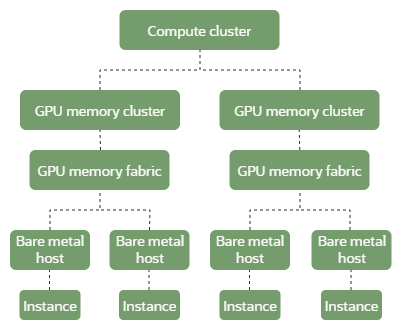
To further explore these relationships, use these sample commands:
-
To list all GPU memory fabrics in your regional dedicated capacity:
Use thecompute-gpu-memory-fabric listcommand and required parameters:oci compute compute-gpu-memory-fabric list --compartment-id ocid1.tenancy.oc1... # use the root compartment / tenancy OCID -
To get more details about a specific GPU memory fabric:
Use thecompute-gpu-memory-fabric getcommand and required parameters:oci compute compute-gpu-memory-fabric get --compute-gpu-memory-fabric-id ocid1.computegpumemoryfabric.oc1... -
To find the GPU memory fabric and instance associated with a bare metal host:
Use thecompute-host getcommand and required parameters:oci compute compute-host get --compute-host-id ocid1.computebaremetalhost.oc1... -
To find all bare metal hosts on a given GPU memory fabric:
Use thecompute-host listcommand and required parameters:oci compute compute-host list --network-resource-id ocid1.computegpumemoryfabric.oc1... -
To find the GPU memory cluster an instance belongs to:
Use theinstance getcommand and required parameters:oci compute instance get --instance-id ocid1.instance.oc1... -
To find the compute cluster, GPU memory fabric, and instance configuration associated with a GPU memory cluster:
Use thecompute-gpu-memory-cluster getcommand and required parameters:oci compute compute-gpu-memory-cluster get --compute-gpu-memory-cluster-id ocid1.computegpumemorycluster.oc1.... -
To list all instances in a GPU memory cluster:
Use thecompute-gpu-memory-cluster-instance-summary list-compute-gpu-memory-cluster-instancescommand and required parameters:oci compute compute-gpu-memory-cluster-instance-summary list-compute-gpu-memory-cluster-instances --compute-gpu-memory-cluster-id ocid1.computegpumemorycluster.oc1.... -
To see additional details about a compute cluster:
Use thecompute-cluster getcommand and required parameters:oci compute compute-cluster get --compute-cluster-id ocid1.computecluster.oc1....
For a complete list of flags and variable options for the Compute service CLI commands, see the command line reference for Compute.